Wren

Your own AI operator for the work that keeps slipping.

Wren keeps your inbox handled, your follow-ups kept and your routine work done. It works only inside limits you set, asks before anything leaves your hands, and shows you what it did.

Sign-up is by invitation while we onboard the first customers. 14 days free, then $49 or $99 a month, cancel any time. See how it works.
A Wren chat. The owner asked Wren to ask the supplier when order 4417 ships. Wren drafted the email and shows an approval card with Approve and Reject buttons before anything is sent.

The real app, unretouched. You asked for a supplier chase. Wren drafted it, and nothing goes out until you press Approve.

What you get

Four things that stop being your problem.

Every line below is something Wren does today. Where there is a limit, it is written next to the claim.

Your inbox, handled

Every morning a routine tells you what came in, the three things that need you, and what it already filed, archived and unsubscribed. Years of backlog clear in one approved pass. New mail lands in your own labels.

  • Archive, trash and unsubscribe from senders you approve, with a log and undo for every move.
  • Replies drafted for you to edit and send from the chat.
  • A summary at the hour you choose: what came in, what needs you.
  • Search of your real mailbox, not a copy.

Gmail and Google Workspace today. Wren never deletes mail, never sends without your approval, and never moves mail from people you email, threads you replied in, or starred mail.
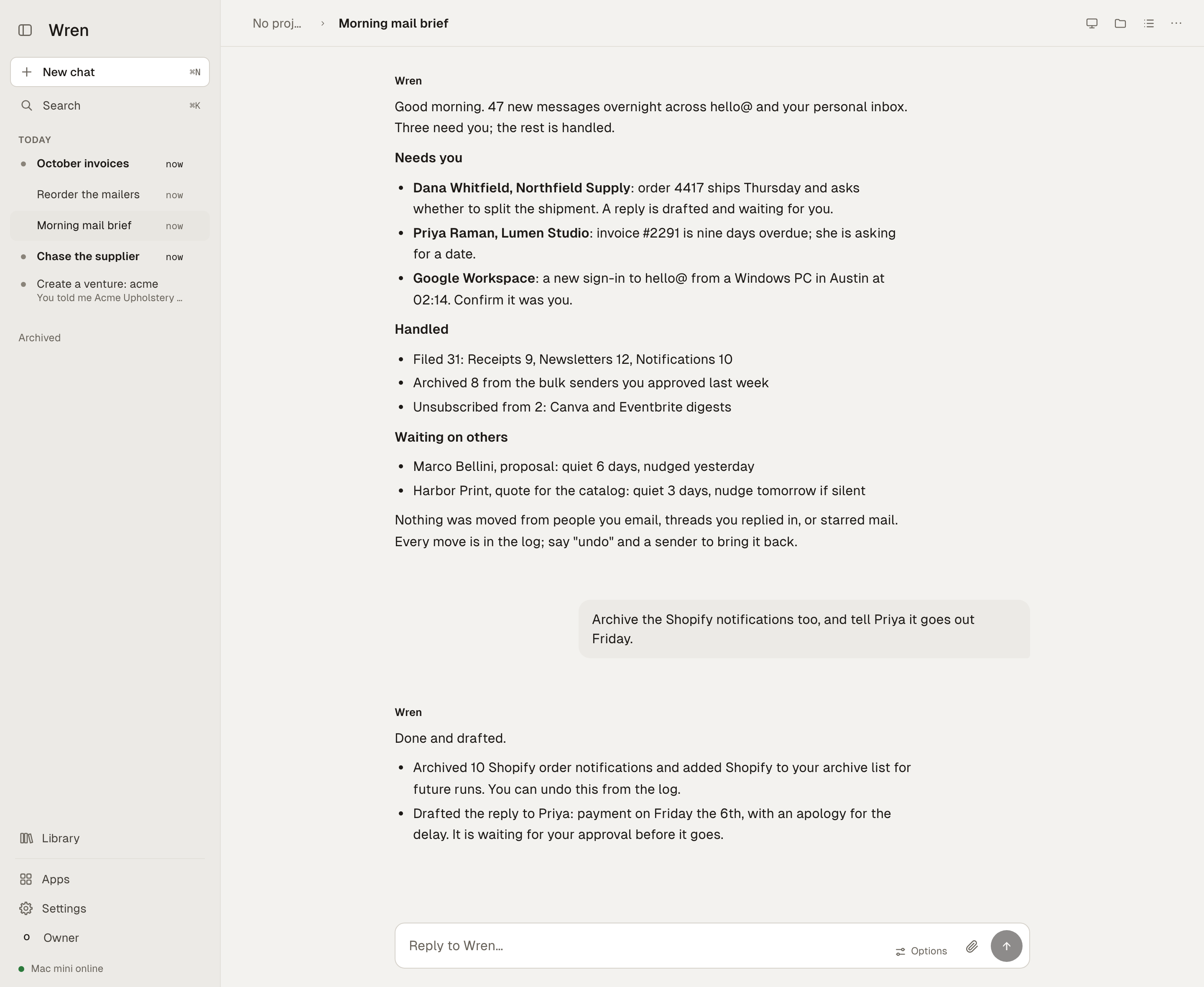
A Wren chat titled Morning mail brief. Wren reports 47 new messages overnight, three that need the owner, what it filed, archived and unsubscribed, and who it is still waiting on. The owner replies to archive Shopify notifications too, and Wren confirms it is done and a reply is drafted.

A morning routine's report, and the owner's one-line follow-up.

Nothing slips

Wren keeps a list of conversations waiting on someone else and nudges when they go quiet, inside the deadline you set. It remembers the commitments you made in email and chat and brings them back at the right time.

  • Routines run on a schedule and report in one message, not twenty.
  • When Wren is blocked on you, it waits and tells you why. The task does not quietly die.
  • Everything waiting on you is pinned in one place when you open the app.
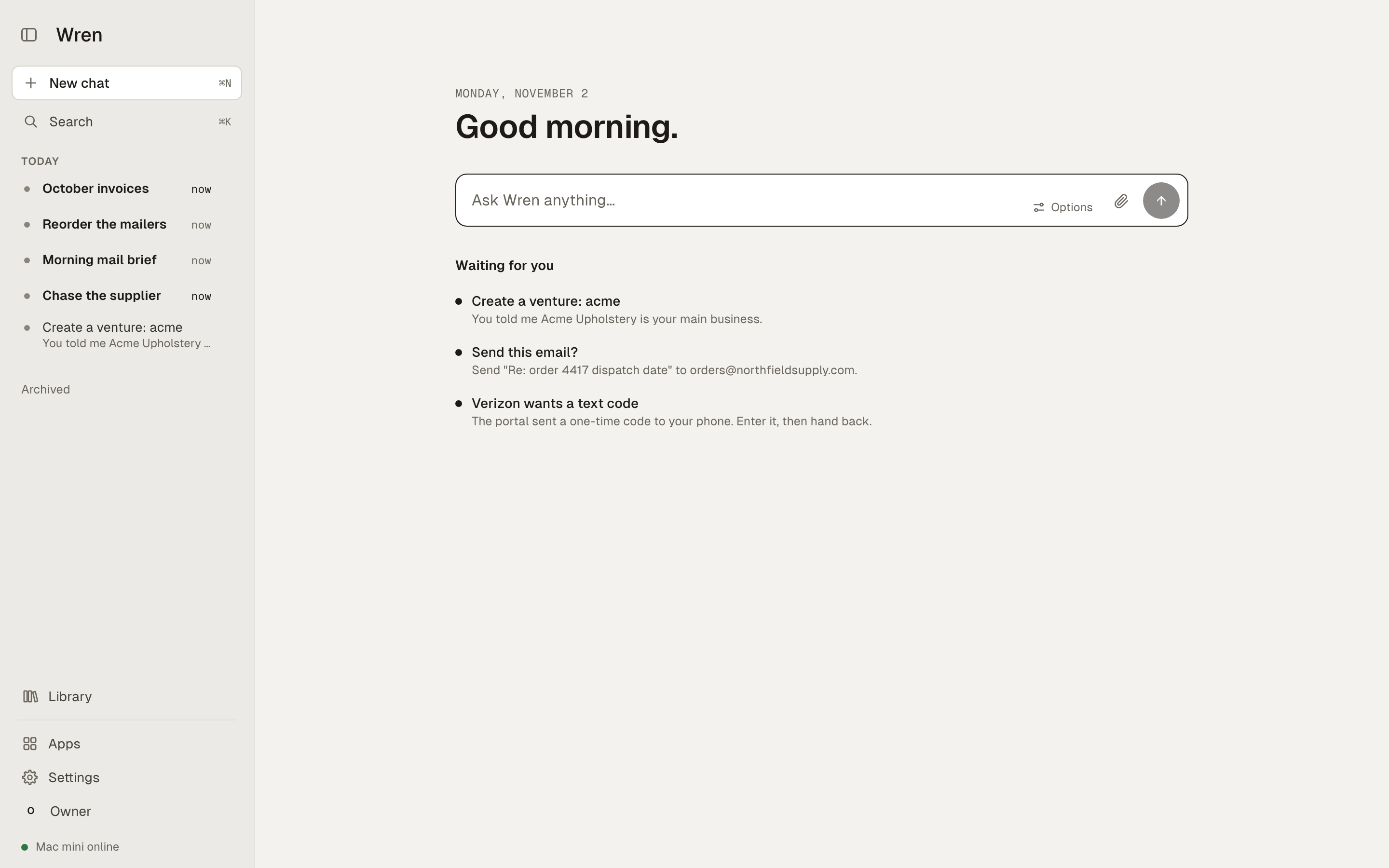
Wren's home screen: Good evening, a message box, and a Waiting for you list with two items that need the owner's decision.

Work done on the web, with your sign-ins

Wren is an operator, not a chatbot. It signs in to the sites you already use with logins from your vault, finds the order, fills the cart, downloads the invoice, and tells you exactly what it did. You can watch its screen live from the chat.

  • Paying is yours. Wren builds the cart and stops at the Pay button, or places the order once you say so.
  • When a site needs you, for a text code or a new password, Wren hands you the browser and takes it back when you are done.
  • Your passwords stay in your vault. Wren fills them and never shows them in chat.

Not every website works. We say "the sites we have run it on", never "any site". Ask us about yours.

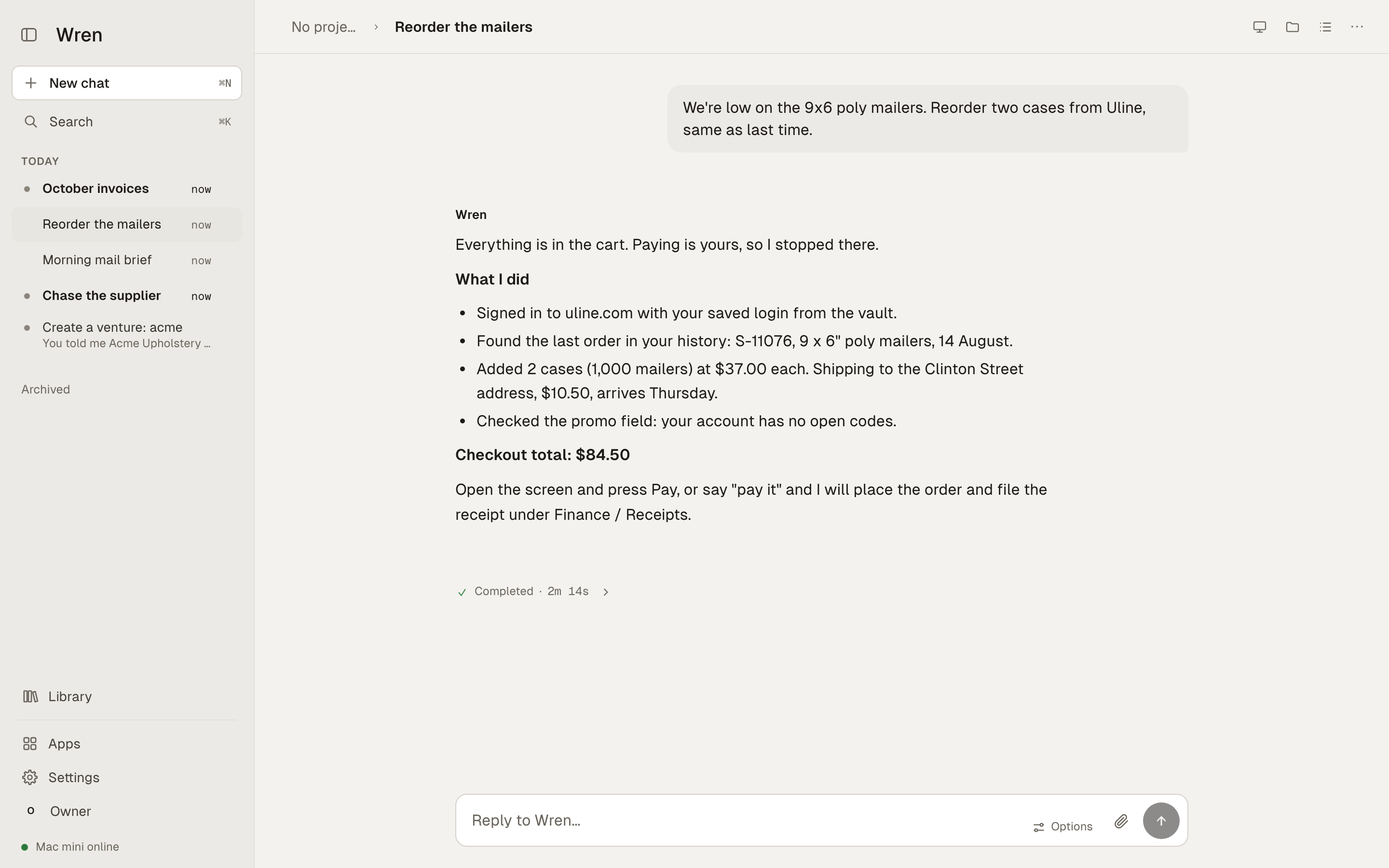
A Wren chat titled Reorder the mailers. The owner asks for two cases of 9x6 poly mailers from Uline. Wren reports it signed in with the saved login, found the last order, added two cases with shipping, and stopped at the $84.50 checkout because paying is the owner's.
A reorder on a supplier site. Wren used your saved login, found the last order, built the cart, and stopped at payment.
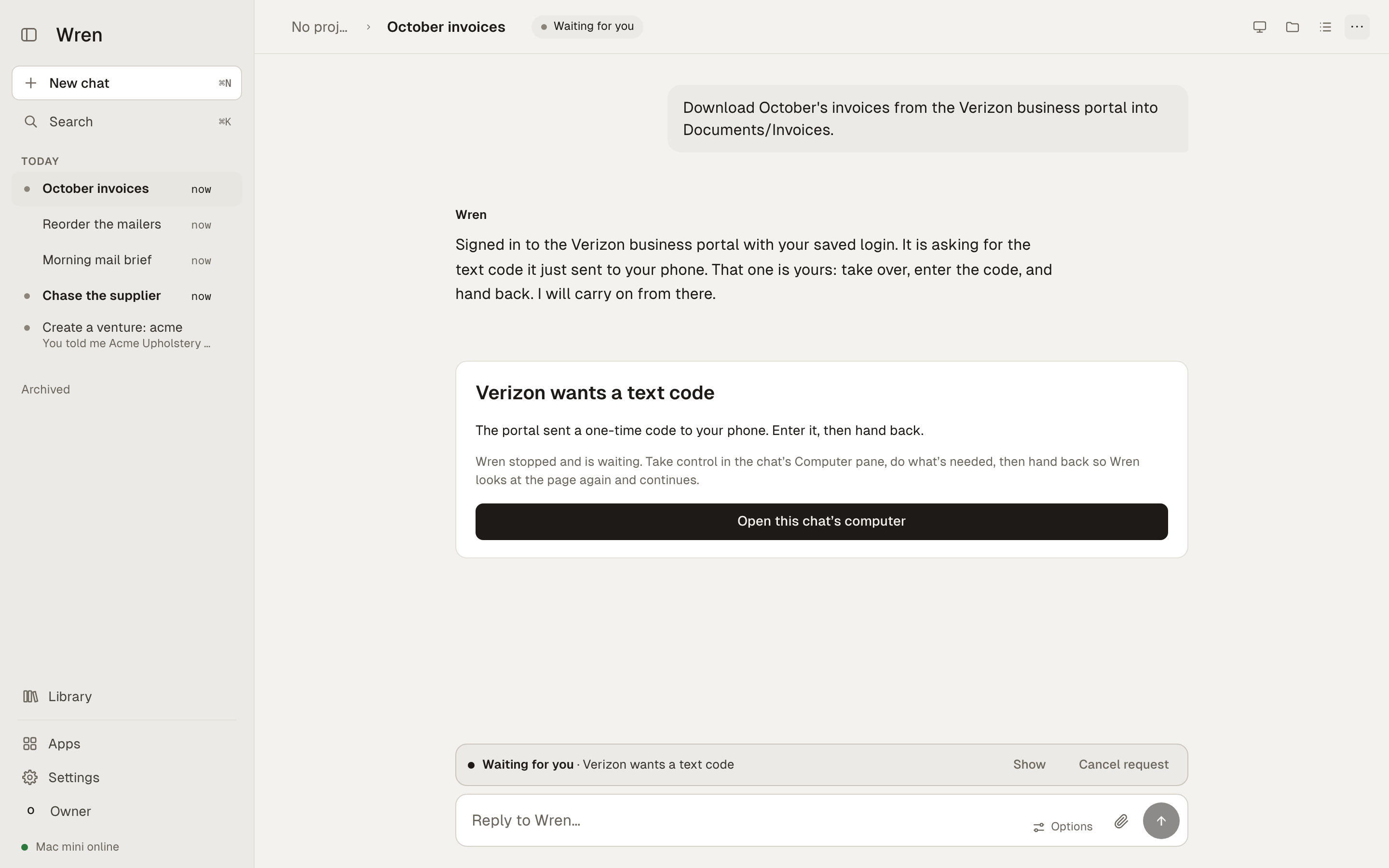
A Wren chat titled October invoices. The owner asks for October's invoices from the Verizon business portal. Wren signed in, the portal asked for a text code, and a card titled Verizon wants a text code offers to open this chat's computer so the owner can enter it and hand back.
An invoice download behind a two-factor code. Wren hands you the browser for the code, then carries on.

A team when you need one

Ask for a salesperson, a marketer, a support person, a finance assistant or an operations lead for one of your businesses. Wren sets one up with a written role and the limits you choose, and hands it the work that fits.

  • Teammates draft. Nothing is posted, sent or published until you approve the exact text.
  • Long jobs run in the background for hours and report back when done.
  • Each business is its own workspace: its own mail, connections, teammates and rules.

Sales

Turns interest into a booked call, or a clear no, and keeps every conversation moving.

Marketing

Plans before it writes, drafts in your voice, marks every claim that needs proof.

Support

Leaves each customer with a correct answer or a clear next step.

Finance

Makes sure you can trust the numbers and understand what they mean.

How it works

You ask. Wren works. You see what it did.

There is one Wren to talk to. It uses apps for mail, calendar, the browser and the services you connect, and it brings in a teammate when a job calls for one. You never route work yourself.

Ask in plain words

"Clean up my inbox, show me the senders first." Wren plans the work and tells you what it is about to do.

Wren does the work

Inside the limits you set: which accounts, which people, how often, how much. Standing rules can only narrow what Wren does, never widen it.

Outside effects wait for you

Sending, posting, paying, deleting: each is an ask you approve from your own device, with the exact content shown. Everything else just happens.

Start today

Say what you want handled. Wren takes it from there.

Create an account, connect Gmail, and ask. You can have real work back within the hour. These are the asks that pay off first.

Clean up my inbox. Show me the senders first.You get a quiet inbox the same afternoon. Wren lists who fills it and moves nothing until you approve the list; every move can be undone.
What is waiting on a reply from someone else?You get the open threads in one list, and the quiet ones nudged inside a deadline you set.
Every weekday at 8, send me what came in overnight and what needs me.You get one morning message instead of a scroll. Turning it on asks once; turning it off pauses it.
Draft a reply to Sarah about the invoice. I will read it before it goes.You get the draft in the chat with Approve and Reject. Nothing is sent until you press Approve.
Log in to the supplier portal and download October's invoices.You get the files in your folder. Wren uses a login from your vault and hands the browser to you if the site asks for a code.
Set up a salesperson for Acme and follow up on last week's inquiries.You get every inquiry answered or chased, with each send waiting for your approval.

Private, and yours to stop

One Wren per customer. Nothing shared.

Your own machine

Each customer's Wren runs on its own instance with its own data. There is no shared database of your mail, files or sign-ins.

You hold the keys

Every outside action is an approval you give from your own paired device, on your laptop or the iPhone app. Standing rules can only narrow what Wren may do.

Stop any time

Stop a task, pause a routine, disconnect a service or delete the whole account. Each is one action, and deleting is final.

Your data is not the product

We do not sell your data, use it for advertising, or train AI models on it. The privacy policy says the rest in plain words.

Passwords stay in your vault

Wren fills sign-ins from your password vault and never shows them in chat.

Mistakes stay visible

Wren tells you what it checked, what it changed and what it could not do. A failed job says so; it does not claim success.

Pricing

Two plans. The same Wren.

The difference is who pays for the AI. Wren works the same either way, and keeps working on a local model if your provider is down.

Bring your own key

$49 / month

You connect your own Anthropic, OpenAI or OpenRouter key and pay them for usage.

  • Your private Wren, web and iPhone
  • Mail, routines, browser, teammates, every connection
  • 14 days free, then $49
Request an invitation

One trial per account. Card at checkout; nothing is charged until the trial ends. Prices in USD. Prefer to run Wren on your own Mac mini? Ask us.

Questions

Straight answers.

Will Wren send email on its own?

No. Sending, posting, paying and deleting are outside effects. Each one waits for your approval with the exact content shown, unless you have set a standing rule for it yourself, and a standing rule can only narrow what Wren does.

What does it connect to?

Today, with a sign-in you give on each service's own screen: Gmail, Google Calendar, LinkedIn and LinkedIn Pages, Facebook and Instagram, TikTok, GitHub, Cloudflare, Google Analytics, Search Console, Stripe, Resend and Cal.com. More are in the product's connector gallery; we list them here only once we have run them for real.

Where does my data live?

On your own Wren instance. Enbrite does not keep a central database of your messages, files or account data. Text needed for a task is sent to the AI model provider you chose, or ours on the AI-included plan, under their terms. We do not sell it, advertise with it, or train models on it.

Does it work with Outlook?

Not yet on the hosted service. Gmail and Google Workspace are what we run today. Tell us if Outlook is what you need; it decides what we build next.

Can it browse any website?

Many, not all. Sites with unusual sign-ins or bot protection can stop it; when that happens Wren hands the browser to you instead of guessing. Ask us about the specific portals you use.

What happens when it gets something wrong?

Mail moves are logged and can be undone. Outside effects never happen without your approval. Finished work shows what was checked and what was changed, so you can see a mistake rather than discover it later. AI drafts can be wrong; read anything that matters before you approve it.

Can I run it on my own hardware?

Yes. Wren began as software for a Mac mini in the owner's own home or office, and that is still available. Email us and we will set it up with you.